AegixFMEA Platform

Design FMEA

Design FMEA that starts from your requirements.

Aegix builds the DFMEA structure from the requirements and specifications you already have, drafts functions and failure modes for your engineers to review, and keeps every failure mode linked to the requirement it threatens.

app.aegix.eu / dfmea-structure
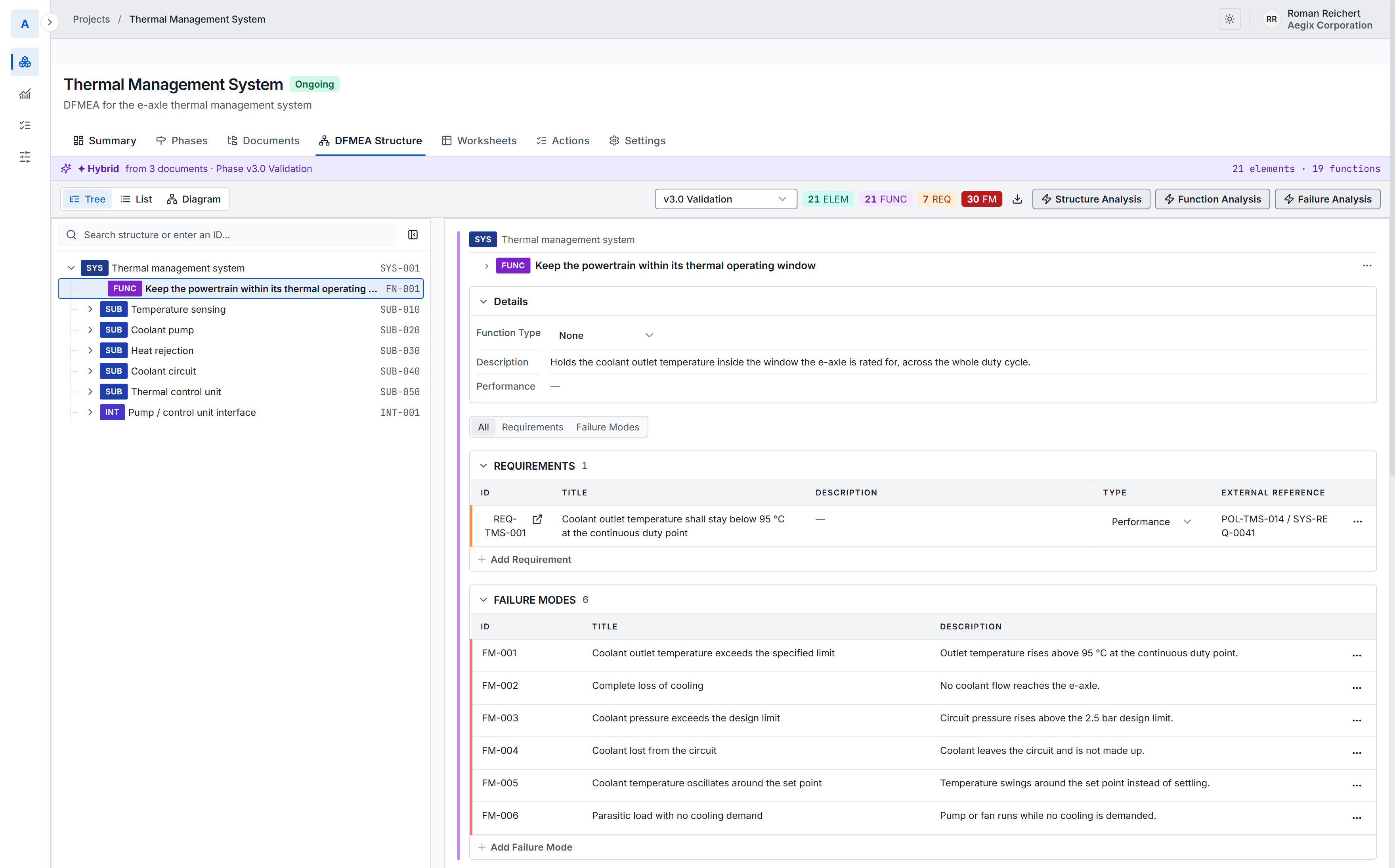
The DFMEA structure of a thermal management system in Aegix. A tree on the left holds the system, its function, five subsystems and an interface, each with its artifact code. The inspector on the right shows the selected function: its description, the requirement it has to meet with the Polarion item that requirement came from, and the six failure modes found for it.

The system, its subsystems and an interface, with the requirement and the failure modes on the selected function.

The method

From the architecture to the failure chain, step by step.

Aegix follows the AIAG & VDA steps for a design analysis. Each step starts from what the previous one produced, so nothing is entered twice.

1

Structure

System, subsystems, components and the interfaces between them.

2

Functions

What each element has to do, with the requirement it has to meet.

3

Failures

The failure mode of the focus element, its effect one level up and its cause one level down.

4

Risk

Severity, occurrence and detection, and the Action Priority they give.

5

Optimisation

Prevention and detection actions with an owner and a due date, then the new ratings.

Requirements

Every failure mode knows which requirement it threatens.

Requirements come from your ALM, such as Codebeamer or Polarion, and keep their id. Each function carries the requirement it meets, so a failure mode points back to it, and forward to the verification that covers it.

When a requirement changes, you can see which part of the DFMEA depends on it.

Requirement
Coolant outlet temperature stays below 95 °C at the continuous duty point.
Function
Keep the powertrain within its thermal operating window.
Failure mode
Coolant outlet temperature exceeds the limit.
Cause
Temperature sensing failure.
Verification
The test that covers the requirement.

The worksheet

The AIAG & VDA form, with nothing to copy across.

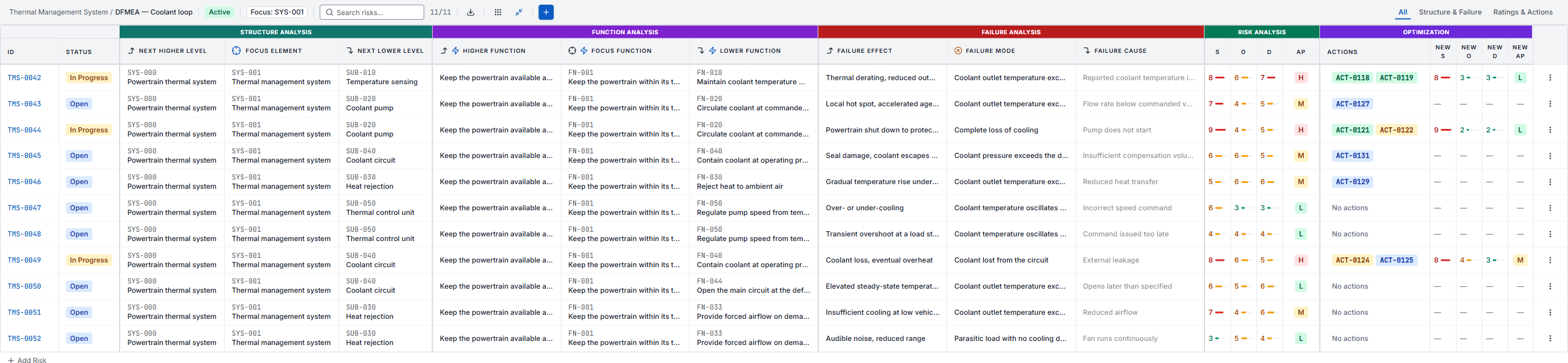
Next higher level, focus element and next lower level, their functions, then effect, failure mode and cause, the ratings, the Action Priority and the actions. The worksheet is filled from the structure, not typed twice.

app.aegix.eu / worksheet
A complete AIAG-VDA DFMEA worksheet in Aegix, with every column group side by side: structure analysis, function analysis, failure analysis, the severity, occurrence and detection ratings with the action priority they produce, and optimisation with the linked actions and re-rated values.

Scroll sideways to see the whole worksheet.

Human in the loop

AI drafts the design analysis. Your engineers own it.

From your specifications and architecture documents, AI agents draft the structure, the functions and the failure modes. Each draft waits for an engineer to accept, change or reject it.

Specifications→ AI drafts→ Engineer reviews→ Part of the DFMEA

Questions

Common questions.

What is a Design FMEA?

A Design FMEA (DFMEA) is a failure mode and effects analysis of a product design. It looks at how the design can fail, what the effects would be and what could cause them, so the risks are reduced before the design is released. The AIAG & VDA handbook describes it in seven steps, from planning to documenting the results.

How does Aegix help with a DFMEA?

Aegix builds the DFMEA structure from your requirements and specifications, drafts functions and failure modes for your engineers to review, rates each failure chain with Action Priority, and tracks the actions until the risk is re-rated.

Which method does Aegix follow?

The AIAG & VDA FMEA method, with severity, occurrence and detection ratings and Action Priority. Templates are configurable for other terminology, rating scales or worksheet layouts.

Does Aegix connect to our ALM?

Yes. Aegix reads requirements from your ALM, such as Codebeamer or Polarion, and keeps each one linked to its source. FMEA actions can go to your task tool, such as Jira.
See it on an FMEA like yours.

A guided walkthrough with our engineers, on a sample project. Ask a question first if you prefer.

Aegix is a product of XWARE, developed with a grant from Innoviris. XWARE is a partner of hub.brussels.